
Let’s be honest: most business owners think cybercriminals spend weeks meticulously planning sophisticated attacks against their servers. In reality, hackers act a lot like late-night opportunistic burglars walking down a street, checking for unlocked doors and open ground-floor windows.
They count on you being too busy running your business to check the basic digital seams of your company. Whether your team operates out of Manhattan, manages remote staff across Brooklyn and Queens, or runs logistics through Newark and Jersey City, automated scanning bots are constantly probing your network for quiet, overlooked blind spots.
If you want to keep your company safe, you need to start checking the exact areas hackers are praying you ignore.
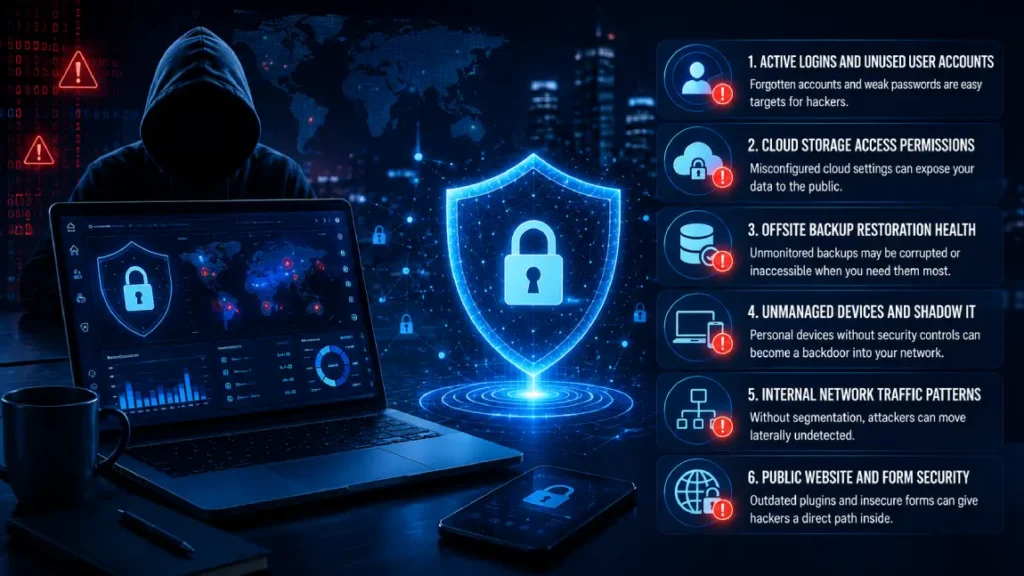
1. Active Logins and Unused User Accounts
When an employee leaves your company, does their user account get terminated immediately? Hackers actively hunt for forgotten, dormant accounts with weak or reused passwords. Once inside, they use these abandoned credentials to quietly navigate your system.
Bringing in a seasoned managed IT & Cyber Security services company ensures strict identity governance and automated offboarding. With continuous IT infrastructure management, administrative privileges are regularly audited, closing old entry points before a former employee’s credential can be exploited.
2. Cloud Storage Access Permissions
Moving to the cloud speeds up collaboration, but it also creates room for silent misconfigurations. A single employee sharing an internal folder via an open, public link can leave your proprietary databases exposed to internet search engines.
Specialists in cloud migration services and cloud computing solutions build your environment using strict “least-privilege” access controls. Utilizing managed cloud services means your cloud drives are routinely scanned behind the scenes to fix accidental public exposures automatically.
3. Offsite Backup Restoration Health
Having a backup running in the background is great, but when was the last time you actually tried restoring your data from it? Hackers hope you never check your backups because unmonitored backup files are often corrupted, incomplete, or easily encrypted during a ransomware attack.
Enterprise data backup and recovery and comprehensive data protection services rely on automated, immutable backups stored in isolated secure cloud computing repositories. Running routine live restoration drills guarantees your team can recover clean files in minutes without ever paying an extortionist.
4. Unmanaged Devices and “Shadow IT”
Hybrid work schedules mean staff regularly check work emails on personal smartphones or log in from home laptops in Astoria, Williamsburg, or Hoboken. If these personal devices lack security monitoring, they become unmonitored backdoors into your corporate environment.
Deploying modern endpoint security solutions alongside robust network security solutions ensures every single device touching your network is encrypted and tracked. Backed by responsive IT support services, your engineering team can instantly isolate an unmanaged or infected device before a threat spreads.
5. Internal Network Traffic Patterns
If an attacker breaches a low-level device—like an office printer or a front-desk computer—do you have internal walls preventing them from accessing executive emails or payroll? Flat networks allow hackers to move sideways completely unnoticed.
Proper IT infrastructure security relies on smart network segmentation, keeping guest Wi-Fi, internal ops, and financial data in isolated lanes. Paired with active threat detection and response and specialized managed security services, any unusual internal traffic spike triggers an immediate, automated lockdown.
6. Public Website and Form Security
Your public website is often the first thing hackers scan. Outdated plugins, unencrypted contact forms, or old databases on your public site give bad actors a easy bridge into your broader corporate network.
Partnering with an experienced web development company ensures your public platforms use web application firewalls and clean code. Linking your front-end assets directly with scalable cloud solutions and secure business cloud services keeps your brand reputation protected and your customer data isolated from risk.
Talk to Our IT Experts Today
Stop guessing where your security gaps are hiding. Protect your organization with 24/7 threat monitoring, tailored cloud management, and dependable local engineering built for businesses across New York and New Jersey.
Contact Wavestek today to schedule your free security assessment and close your digital blind spots.
Frequently Asked Questions
Q: What is the biggest security gap small businesses overlook?
A: Unused employee accounts and missing multi-factor authentication (MFA) are the two most common blind spots hackers exploit.
Q: How do managed IT services help secure cloud environment access?
A: Managed IT teams continuously audit permissions, enforce least-privilege access, and automatically fix misconfigured sharing settings.
Q: Why is testing data backups so critical for cybersecurity?
A: Ransomware specifically targets backups; routine restoration drills verify that your data is uncorrupted and recoverable in a crisis.
Q: How does network segmentation prevent cyberattacks?
A: It divides your network into isolated zones so an attacker who breaches one device cannot move sideways into sensitive files.